AI POSM Design to Print: How to Fix AI Artwork Before Printing Retail Displays
Using AI to create POSM ideas? Learn which AI designs can be used, which ones need to be rebuilt, and how to turn AI artwork into print-ready files for wobblers, shelf talkers, counter displays, banners and retail POSM.
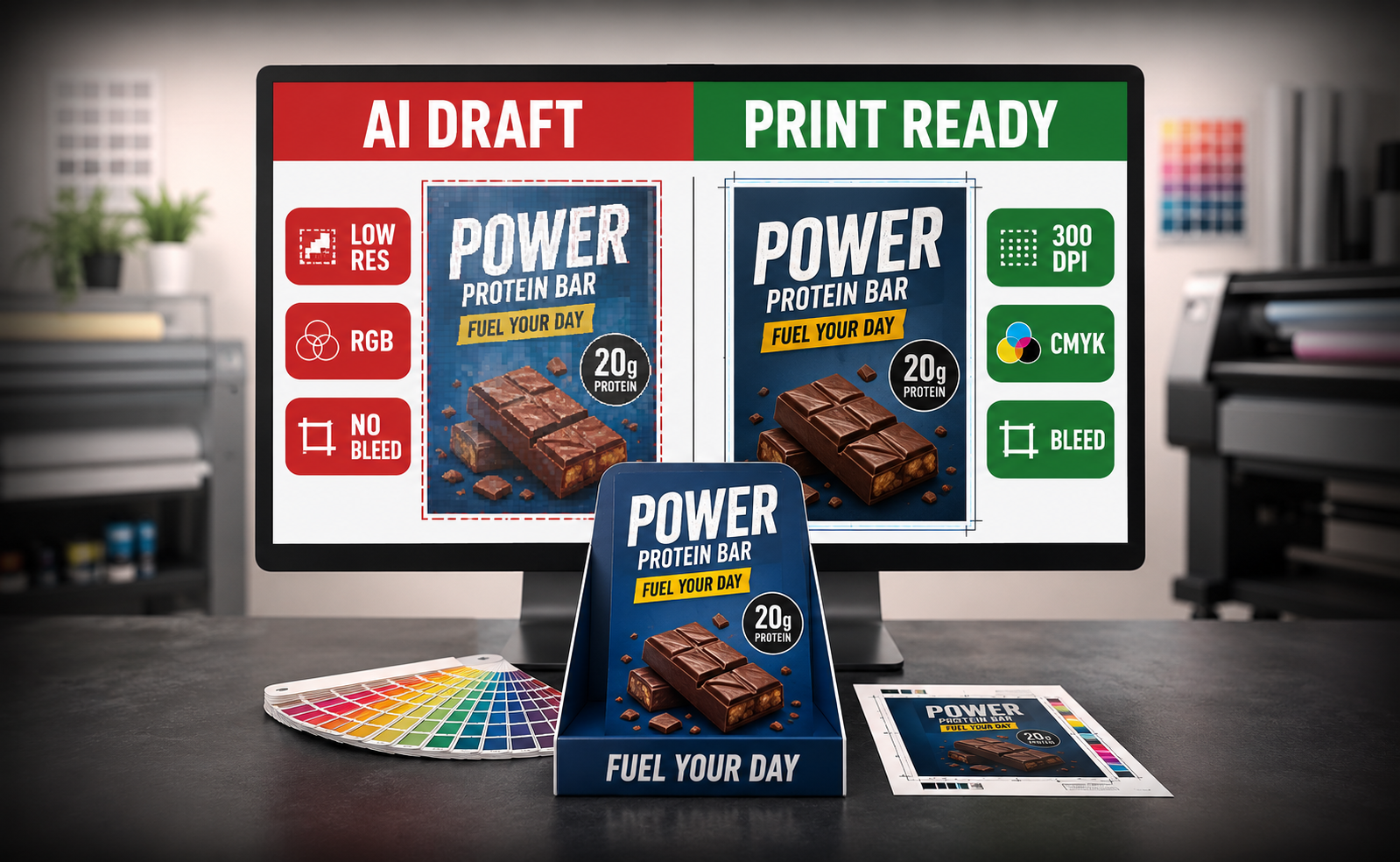
AI POSM Design Printing
Quick Answer
You can use AI design for POSM printing, but most AI images should not be printed directly.
Keep the AI image as a reference, then rebuild the important parts: real text, real logo, real product photo, final print size, bleed, safe margin, QR code and POSM template or dieline.
First, Check What Kind of AI File You Have
The next step depends on the file you have. Some AI files can be used as visual reference, some need cleanup, and some should be rebuilt completely before printing.
If Your AI Image Is Low Resolution, Can It Still Be Printed?
It depends on what the low-resolution image is used for. Some low-res AI images can be adjusted. Some should not be used as final printing artwork.
If AI Details Look Messy, What Should Be Fixed?
Messy AI details should not all be solved by “enhance image”. Some parts can be cleaned, some should be replaced, and some need to be rebuilt from scratch.
Design decision: do not keep every AI detail. Keep the useful idea. Remove details that do not help customers read, scan or buy.
For POSM, Confirm Size and Template Before Designing
POSM is not always normal rectangle artwork. Some items need a specific template, dieline or box structure file before the design can be placed correctly.
If you already have an AI design, send it to Vonx first before finalising the artwork. We can advise whether it fits the selected POSM size or whether it needs to be rebuilt into the correct structure file.
AI Artwork Rescue Process
The goal is not to throw away your AI idea. The goal is to keep the useful concept and rebuild the parts that affect printing.
STEP 1
Decide what can be kept
Keep the mood, colour direction, background style or campaign idea. Replace AI-generated text, logo, QR code and product details.
STEP 2
Check the final POSM size
Confirm whether the artwork is for wobbler, shelf talker, counter display, hangsell display, backdrop, flyer or another item.
STEP 3
Follow the template or dieline
If the POSM has folds, slots, hooks, layers or a box structure, the artwork must follow the correct template before printing.
STEP 4
Rebuild important elements
Retype headline, price, offer, product claims, WhatsApp number and address. Insert real logo, real product photo and real QR code.
STEP 5
Clean or replace the AI image
Background can sometimes be enhanced or simplified. Product image, logo, text and QR code should usually be replaced with proper files.
STEP 6
Add print setup
Prepare bleed, safe margin, CMYK setup, high-resolution export, cut line, fold line and QR scan test before production.
POSM-Specific Fixes: What AI Usually Misses
How Vonx Can Help With AI Artwork
You do not need to abandon your AI idea. But before printing, the idea needs to be cleaned, rebuilt and fitted into the correct POSM size or template.
Common AI POSM Printing Mistakes
1. Designing before confirming the POSM size.
If the final size changes later, the layout may need to be rearranged.
2. Not following the template or dieline.
For structured POSM, artwork must follow the fold line, cut line, slot area, glue area and safe margin.
3. Trying to upscale AI text, logo or QR code.
These should not be enhanced. They should be rebuilt with real fonts, original logo file and real QR code.
4. Using AI product image as the real product.
AI may change product shape, label, colour or packaging details. Use real product photos for final printing.
5. Keeping too many AI-generated details.
Extra patterns, fake icons and messy shadows can look noisy when printed.
6. Treating AI mockup as production artwork.
A mockup is only an idea. Real production still needs size, material, structure, template and print file setup.
Send Us Your AI POSM Design Before Printing
Send us your file first. We can advise whether it can be printed, needs minor adjustment, or should be rebuilt into proper print-ready artwork.
File details: AI-generated image, Canva draft, original prompt if available, template or dieline if provided.
POSM details: POSM type, required size, display location, quantity and deadline.
Brand details: Real logo file, real product photo, final wording and QR code link.
Service details: Design + print or print only.
Need Help Turning AI Ideas into Print-Ready POSM?
Vonx Printing provides POSM printing and in-house design support. If you already have an AI-generated idea, we can help check, clean up, rebuild or adapt it into a proper print-ready file.
This is useful when you want to print shelf talkers, wobblers, counter top displays, hangsell displays, event backdrops, banners or other retail POSM materials.
You can also read our POSM Printing Malaysia guide if you are still deciding which POSM item is suitable for your campaign.
READY TO PRINT?
Need AI POSM Design Checking Before Printing?
Send us your AI image, Canva draft, POSM type, size, real logo, product photo, final wording, QR code link, display location, quantity and deadline.
We can help check whether your artwork can be printed directly, cleaned up, or rebuilt into proper print-ready POSM artwork.
Get a Quote WhatsApp AI Design for CheckingAI POSM Design Printing FAQ
1. Can I print an AI-generated POSM design directly?
Usually not directly. AI designs are useful for concept and reference, but the final artwork still needs correct size, real text, real logo, high-resolution images, bleed, safe margin and print setup.
2. Can a low-resolution AI image be fixed for printing?
It depends. If it is only used as a soft background, it may be enhanced or simplified. If it is the main product image, logo, text or QR code, it should usually be replaced or rebuilt instead of only upscaled.
3. Why should I confirm POSM size before designing?
POSM sizes are not always standard. If you design before confirming the final size, the artwork may not fit the actual shelf talker, wobbler, counter display, backdrop or display structure.
4. Do structured POSM items need a template or dieline?
Yes. POSM items with folds, slots, hooks, flaps, layers or box-like structures usually need a proper template or dieline. Important text should not be placed on fold lines, cut lines, slot areas or product blocking areas.
5. Can Vonx fix my AI design for printing?
Yes. Vonx can help check your AI image, rebuild the layout, replace AI text with real typed content, apply real logo and product photos, adjust the artwork to the correct size and prepare print-ready files.
6. Can AI-generated text be used in printed artwork?
It is not recommended. AI-generated text can contain spelling errors, fake letters or distorted words. All important text should be retyped manually using real fonts before printing.
7. Can an AI POSM mockup become a real display?
Yes, but it needs to be converted into a practical production structure first. The final design must consider size, material, product weight, fold lines, slots, layers, stability and print file setup.
8. What should I send if I only have an AI image?
Send the AI image, POSM type, required size if available, real logo file, product photo, final wording, QR code link, display location, quantity and deadline. If size or template is not confirmed, send the idea first so we can advise.